One of the most common sources of problems in an online store is the delivery address entered manually by the customer. Incorrect postal code, a street name with a typo, a city abbreviated in a way the delivery service doesn’t understand. As a result, the manager calls the customer to clarify details, manually corrects the order — and still sometimes the package goes to the wrong place.
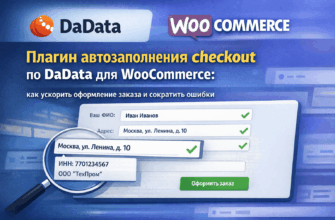
Address autocomplete via DaData solves this problem at the form level. The customer starts typing the street name — the system suggests options, the customer selects the correct one, and the other fields fill in automatically. No typos, no calls for clarification.
In this article, we’ll explain what DaData is, how it works in WooCommerce, and what really changes after integration.
- What is DaData
- Why WooCommerce’s standard address fields don’t work well
- How DaData autocomplete works in WooCommerce
- What is filled in automatically
- Autocomplete by INN for legal entities
- What changes after integration: practical results
- Is a paid DaData plan necessary?
- How to connect DaData to WooCommerce
- Common mistakes during integration
- Conclusion
What is DaData
DaData is a Russian service for working with data: addresses, full names, tax identification numbers (INN), company details, and banking data. The service provides an API through which a website can verify and supplement data entered by users in real time.
For online stores, two tools are especially useful:
Address autocomplete. The customer starts typing a city, street, or any part of the address — DaData suggests hints from an up-to-date database of addresses in Russia and the CIS. When an option is selected, all form fields fill automatically: city, region, street, postal code.
Autocomplete by INN. The customer enters the company’s INN — DaData pulls the full organization name, legal address, KPP, and other details. Indispensable for stores working with legal entities.
DaData’s database is based on FIAS, EGRUL, and EGRIP data — official government registries. This means current addresses, including new streets and renamings.
Why WooCommerce’s standard address fields don’t work well
The standard WooCommerce checkout offers several text fields: country, city, address, postal code. All of these are filled manually by the customer, without any suggestions.
In practice, this leads to predictable problems:
Different formats of the same address. One customer writes “Lenina St., 5”, another — “Lenina street bldg. 5”, a third — “Lenina 5”. For the delivery service, all three can be problematic.
Errors in postal codes. Most people don’t remember their postal code by heart. Some Google it, others guess, some leave the field empty.
Nonexistent addresses. The customer writes the address from memory and makes a mistake in the street name or house number. The package goes to the wrong address.
Problems with Cyrillic and transliteration. Some delivery services require the address in a specific format. Manual input doesn’t guarantee this.
Mismatch with CDEK or other delivery service databases. If the address is not entered in the format expected by the delivery service API, the cost calculation doesn’t work or the order is created with errors.
How DaData autocomplete works in WooCommerce
After installing the plugin, the process for the customer looks like this:
- The customer starts typing any part of the address — city, street, settlement name — in the form field.
- A dropdown list with suggestions from the DaData database appears below the field.
- The customer selects the desired option from the list.
- The form automatically fills all related fields: city, region, street, house, postal code.
The customer does minimal work. The address in the order is always in a standardized format accepted by delivery services.
Technically, this works through the DaData API: each time the customer types a character in the address field, the form sends a request to the API and receives a list of suitable options. Requests are lightweight and fast — delays are unnoticeable.
What is filled in automatically
When selecting an address from DaData suggestions, the following fields in the WooCommerce form are filled:
- country
- region / oblast
- city or locality
- street
- postal code
If the database has data on a specific house, the house number is also pulled. The customer only needs to specify the apartment or office.
Autocomplete by INN for legal entities
For stores working with B2B, DaData is useful not only for addresses. When entering a company’s INN, the system pulls:
- full and short organization name
- legal address
- KPP
- OGRN
- company status (active, liquidated)
This completely eliminates errors when entering company details. The customer enters the INN — the form fills in the rest. The manager receives correct data for invoicing without additional clarifications.
What changes after integration: practical results
From experience implementing in WooCommerce online stores:
Address errors drastically decrease. When the address is selected from the database rather than entered manually, typos simply disappear. Managers stop wasting time clarifying details by phone.
Order processing becomes faster. Customers don’t spend time typing each field manually. This is especially noticeable on mobile devices, where typing is slower.
The cart abandonment rate decreases. A long form with address fields can be intimidating. When most of the form is filled by the system, the psychological barrier lowers.
Delivery cost calculation works correctly. The address in a standardized format is correctly passed to delivery service APIs. Fewer errors when creating orders in CDEK, Russian Post, and other services.
Legal entity data comes without errors. Company details pulled from EGRUL are always correct. Invoices are issued without rework.
Is a paid DaData plan necessary?
DaData offers a free limit: a certain number of requests per month without payment. For a small store with a few dozen orders a day, this is usually enough.
As load grows, a paid plan is activated — the cost depends on the number of requests. For most medium-sized online stores, this is a small amount that pays off many times over by saving managers’ time.
How to connect DaData to WooCommerce
There are two ways.
Ready-made plugin. Installed like a regular WordPress plugin, enter the DaData API key in settings — and autocomplete starts working. Suitable for the standard WooCommerce checkout.
Limitations of the ready-made plugin: fixed set of fields, standard appearance of suggestions, no flexible logic. If your checkout is non-standard or you need integration with other form elements — difficulties may arise.
Custom integration. A developer connects DaData directly via API and embeds autocomplete into your specific form. This allows you to:
- customize suggestion behavior to match your site design
- sync address autocomplete with CDEK pickup point selection
- add INN autocomplete for legal entities in the same checkout
- work correctly with non-standard fields and multi-step checkout
Custom integration takes more time but delivers a result perfectly suited to your project.
Common mistakes during integration
Autocomplete works, but fields aren’t synchronized. The customer selects an address, but the postal code or region doesn’t fill. Usually a problem of mapping WooCommerce fields to DaData data — solved at the plugin code level.
Suggestions appear but conflict with another plugin. If another validation or field customization plugin is active on the checkout page, conflicts may occur. Requires checking and adjustments.
API key entered but requests don’t go through. Sometimes hosting blocks outgoing requests to external APIs. Solved at the server settings level.
Autocomplete doesn’t work on mobile. Happens with incorrect implementation — dropdown doesn’t show or is hidden behind the keyboard. Requires separate testing on real devices.
Conclusion
Address autocomplete via DaData is one of those improvements immediately noticeable to both customers and the store team. Customers place orders faster and without errors. Managers receive correct data and stop wasting time on clarifications. Delivery services get addresses in the required format.
You can connect the basic version through a ready-made plugin in a few minutes. If you need integration with a custom checkout, multi-step process, or legal entity details autocomplete — that’s a developer’s task, but the result is worth it.
If you want to connect DaData to your store or embed autocomplete in a custom checkout — write about your task, we’ll analyze your situation and offer a suitable solution.